Compiling a RAD-Sim Module with RTL
RAD-Sim has the capability to support RTL code (Verilog/SystemVerilog only) through Verilator. Verilator compiles RTL code into a faster optimized model, wrapped inside a C++/SystemC module. More information about Verilator can be found at Veripool.
Installation
Prerequisites:
Follow installation instructions found at Quick Start Guide.
Install Verilator through Git
Instructions here.
It is important to install Verilator through Git, and not through a package manager.
Set Environment Variables
For bash users,
~/.bashrc, for zsh users,~/.zshrc.The values of these variables highly depend on where each library is installed, adjust accordingly
export SYSTEMC_INCLUDE="/opt/systemc/include"export SYSTEMC_LIBDIR="/opt/systemc/lib"export SYSTEMC_HOME="/opt/systemc"export LD_LIBRARY_PATH=${SYSTEMC_HOME}/libexport VERILATOR_ROOT="/usr/local/verilator"
Setting Up a Project with RTL
RAD-Sim has a pre-defined file structure for supporting RTL code. All RTL code must be stored in an rtl folder under the modules folder.
rtl_add
├── modules
│   ├── rtl
│   │   ├── adder.v
│   │   ├── client.v
│   │   ├── fifo.v
│   │   ├── static_params.vh
│   │   ├── port.map
│   │   └── CMakeLists.txt
│   ├── adder.cpp
│   ├── adder.hpp
│   ├── client.cpp
│   └── client.hpp
├── rtl_add_driver.cpp
├── rtl_add_driver.hpp
├── rtl_add_system.cpp
├── rtl_add_system.hpp
├── rtl_add_top.cpp
├── rtl_add_top.hpp
├── rtl_add.clks
├── rtl_add.place
├── CMakeLists.txt
└── config.yml
The RTL source folder additionally contains a CMakeLists script, and an optional port mapping file used for automatic wrapper generation. The CMakeLists script imports the required libraries and verilates the RTL designs to SystemC modules. These objects are linked in the design CMakeLists script.
An example design that utilizes RTL modules can be found in the rad-sim/example-designs/rtl_add folder.
Wrapper Files
Wrapper files are required to connect the SystemC modules to RAD-Sim. RAD-Sim modules are inherited from SystemC modules.
Wrapper files connect SystemC modules to RAD-Sim by instantiating the SystemC module, passing the inputs and outputs to the higher-level modules, and registering the module to the NoC.
Automatic Wrapper Files Generation
RAD-Sim includes scripts to generate basic wrapper files in the rad-sim/scripts directory.
Automatic wrapper generation follows the workflow:
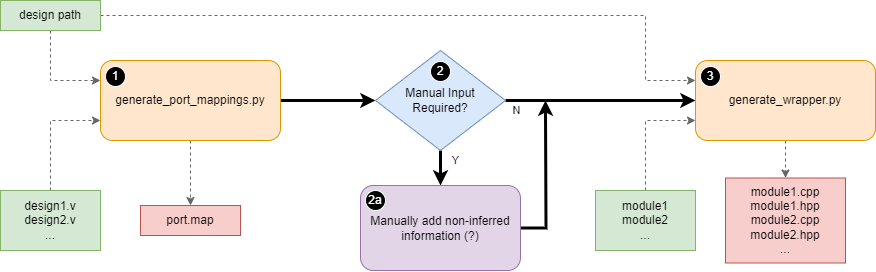
Run
generate_port_mappings.pywith the design path and RTL design files as arguments.ex.
python generate_port_mappings.py adder.v client.v
Check the console for inference warnings.
If there are warnings about information unable to be determined automatically, manual changes to any “?” marks in the
port.mapfile must be made. Theport.mapfile can be found in thedesign_path/modules/rtlfolder.
Run
generate_wrapper.pywith the design path and module names as arguments.ex.
python generate_wrapper.py adder clientNote: these are modules connected to the NoC.
These scripts produce basic source and header wrapper files for the specified RTL modules. Advanced users may edit these files to add additional functionality.
AXI-S Formatting Requirement
Ports in RTL modules using AXI-S must be specified in the format axis_{name}_interface_{signal} to be recognized by the port mappings script.
Port Map File Format
The port map file is a blank-space delimited file used to specify the connection between the Verilator-generated SystemC module to the wrapper RAD-Sim module.
All inputs, outputs, and AXI-S ports must be under a
module.Modules are defined by
module {name}.Input and Output ports are defined by
{input/output} {port_width} {rtl_port} {radsim_port}.AXI-S ports are defined by
axis {master/slave} {rtl_port} {radsim_port}.
An example port map file from the rtl_add example is shown below:
module adder
input 1 clk clk
input 1 rst rst
axis slave axis_adder_interface_tvalid axis_adder_interface.tvalid
axis slave axis_adder_interface_tlast axis_adder_interface.tlast
axis slave axis_adder_interface_tdata axis_adder_interface.tdata
axis slave axis_adder_interface_tready axis_adder_interface.tready
output 128 response response
output 1 response_valid response_valid

module client
input 1 clk clk
input 1 rst rst
input 128 client_tdata client_tdata
input 1 client_tlast client_tlast
input 1 client_valid client_valid
axis master axis_client_interface_tready axis_client_interface.tready
output 1 client_ready client_ready
axis master axis_client_interface_tvalid axis_client_interface.tvalid
axis master axis_client_interface_tlast axis_client_interface.tlast
axis master axis_client_interface_tdest axis_client_interface.tdest
axis master axis_client_interface_tid axis_client_interface.tid
axis master axis_client_interface_tstrb axis_client_interface.tstrb
axis master axis_client_interface_tkeep axis_client_interface.tkeep
axis master axis_client_interface_tuser axis_client_interface.tuser
axis master axis_client_interface_tdata axis_client_interface.tdata